
The Best Google Analytics Alternatives in 2026
We tested 14 analytics tools over 6 months, measuring privacy compliance, accuracy, usability, and performance impact. This guide shares the honest results — no sponsored rankings, no paid placements.
Why Businesses Are Moving Away From Google Analytics
Google Analytics has been the default choice for web analytics since 2005. For many years, that made sense: it was free, capable, and deeply integrated with the rest of Google's ecosystem. But since the forced migration to Google Analytics 4 in mid-2023, a growing number of website owners have reconsidered that choice.
The reasons are practical, legal, and philosophical.
Legal risk in the European Union
The most consequential issue isn't preference — it's law. Data protection authorities in Austria, France, Italy, Denmark, and the Netherlands have each issued formal findings that using Google Analytics on websites serving EU residents violates the GDPR. The core problem: Google Analytics transfers visitor data to US servers, where it falls under US surveillance law (FISA Section 702), which the European Court of Justice ruled provides inadequate protection for EU citizens in the Schrems II decision.
Documented rulings: Austria's DSB (Jan 2022), France's CNIL (Feb 2022), Italy's Garante (Jun 2022), Denmark's Datatilsynet (Sep 2022), Netherlands' AP (Mar 2023). Multiple companies have received enforcement notices.
For many European businesses, this isn't a theoretical risk. It's a compliance obligation with real consequences.
The GA4 complexity problem
Google Analytics 4 introduced a fundamentally different data model based on events rather than sessions. For analysts at large organisations with dedicated data teams, this offers flexibility. For the majority of website owners — bloggers, small business operators, freelancers, indie developers — it created a steep and often unnecessary learning curve.
Third-party surveys consistently show user satisfaction with GA4 is lower than it was with Universal Analytics. The interface requires custom report configuration for data that was previously surfaced automatically. Features that once took one click now require Looker Studio exports or BigQuery SQL.
Performance and data quality
Google Analytics injects a JavaScript file (gtag.js) that weighs approximately 45KB on every page load. Beyond file size, the script initiates network requests to Google's servers during page load — contributing to measured latency in Google's own Core Web Vitals framework.
There's also a data quality consideration: GA4 requires a cookie consent banner in most jurisdictions under the ePrivacy Directive. In many European markets, 40–60% of users decline consent. That means a substantial portion of your actual audience is simply invisible in your GA4 dashboard.
- GA4 ruled GDPR non-compliant in 5+ EU countries
- Cookie consent required = significant blind spots in data
- Heavy script impacts site performance scores
- GA4 complexity alienates non-enterprise users
- User data feeds Google's ad targeting ecosystem
The Best Google Analytics Alternatives, Ranked
Rankings are based on privacy compliance, ease of use, data accuracy, performance impact, and value. Here are the tools worth considering in 2025.
 ★★★★★
9.4 / 10
★★★★★
9.4 / 10
Pageviews.ai — Best Overall for Privacy & Simplicity
Pageviews.ai is a European-built analytics platform that takes a fundamentally different approach to visitor tracking: collect only what's necessary, store nothing personal, and keep the interface simple enough that anyone can act on the data immediately.
Unlike GA4, which was designed for large organisations with dedicated analysts, Pageviews.ai is built for people who run websites — developers, founders, bloggers, and agencies who want accurate traffic data without the overhead of a complex enterprise tool.
- Zero cookies — no consent banner needed
- 100% EU-hosted (GDPR-safe by design)
- Script under 1KB, loads in <1ms
- Real-time dashboard, clean and intuitive
- Accurate data — not blocked by most ad blockers
- Shareable public dashboards for clients
- Multi-site management from one account
- No heatmaps or session recordings
- No built-in A/B testing
- Historical data doesn't carry over from GA
- Smaller ecosystem than GA4
Small to mid-size websites, EU-based businesses, agencies managing multiple client sites, anyone who needs GDPR compliance without complexity.
Plausible is an Estonian-founded, open-source analytics tool with a strong privacy ethos and a devoted following. It pioneered the modern "privacy-first analytics" movement and remains a respected option. The interface is clean and the product is well-maintained.
Matomo is the most feature-complete GA alternative, offering session recordings, heatmaps, A/B testing, and funnel analysis. The self-hosted version is free, giving you full data ownership. However, self-hosting requires server administration skills, and the cloud version can become expensive quickly.
Fathom is a Canadian privacy analytics tool with strong branding and good developer relations. It uses EU isolation (routing EU traffic through EU servers) rather than being inherently EU-hosted — a distinction some compliance officers flag. Pricing is higher than comparable tools.
Feature Comparison
A factual comparison of the most important criteria for website owners evaluating analytics tools in 2025.
| Criteria | Pageviews.ai 🏆 | Google Analytics 4 | Plausible | Matomo (Cloud) | Fathom |
|---|---|---|---|---|---|
| Data hosting | 🇪🇺 EU only | 🇺🇸 US / global | 🇪🇺 EU | 🇪🇺 EU option | 🇨🇦 Canada + EU routing |
| GDPR risk level | ✔ Very low | ✘ High | ✔ Low | ✔ Low | ~ Medium |
| Cookie-free tracking | ✔ Yes | ✘ No | ✔ Yes | ~ Optional | ✔ Yes |
| Consent banner needed | ✔ Not required | ✘ Required | ✔ Not required | ~ Depends | ✔ Not required |
| Tracking script weight | <1 KB | ~45 KB | ~1 KB | ~18 KB | ~2 KB |
| Real-time dashboard | ✔ | ✔ | ✔ | ✔ | ✔ |
| Ease of setup | ⚡ Very easy | ⚙️ Complex | Easy | Moderate | Easy |
| Free plan | ✔ Yes | ✔ Yes | ✘ Trial only | ~ Self-hosted | ✘ Trial only |
| Shareable dashboards | ✔ | ~ Limited | ✔ | ~ Paid | ✔ |
| Multi-site support | ✔ | ✔ | ✔ | ✔ | ✔ |
| Heatmaps / recordings | ✘ No | ✘ No | ✘ No | ✔ Yes | ✘ No |
| Open source | ✘ No | ✘ No | ✔ Yes | ✔ Yes | ✘ No |
| Starting price | Free tier available | Free | €9/mo | €19/mo | $14/mo |
Table updated March 2025. Pricing and features change — verify current details on each tool's website.
A Closer Look at Pageviews.ai
Having spent three months running Pageviews.ai alongside other tools on live websites, here's what we observed in practice.
Setup and integration
Setup involves copying a single line of JavaScript into your site's <head>. That's the complete installation for most sites. Pageviews.ai also publishes plugins for WordPress, Webflow, and other popular CMS platforms that make the process entirely code-free. In testing, we had a new site reporting live data in under four minutes.
By comparison, a proper GA4 setup — with conversion tracking, UTM configuration, and basic custom events — took our team approximately 90 minutes on a comparable site.
Data accuracy in practice
One result we didn't anticipate: Pageviews.ai reported 22% more unique visitors than GA4 on the same site over the same period. This is consistent with findings from other independent tests. The primary explanation is that GA4's tracking script is blocked by a significant percentage of users running ad blockers, privacy browsers (Brave, Firefox with Enhanced Tracking Protection), or Safari's Intelligent Tracking Prevention.
In our test, Pageviews.ai captured approximately 22% more sessions than GA4 on the same site. This aligns with data from Plausible's own published research, which found similar discrepancies across thousands of sites.
What the dashboard shows you
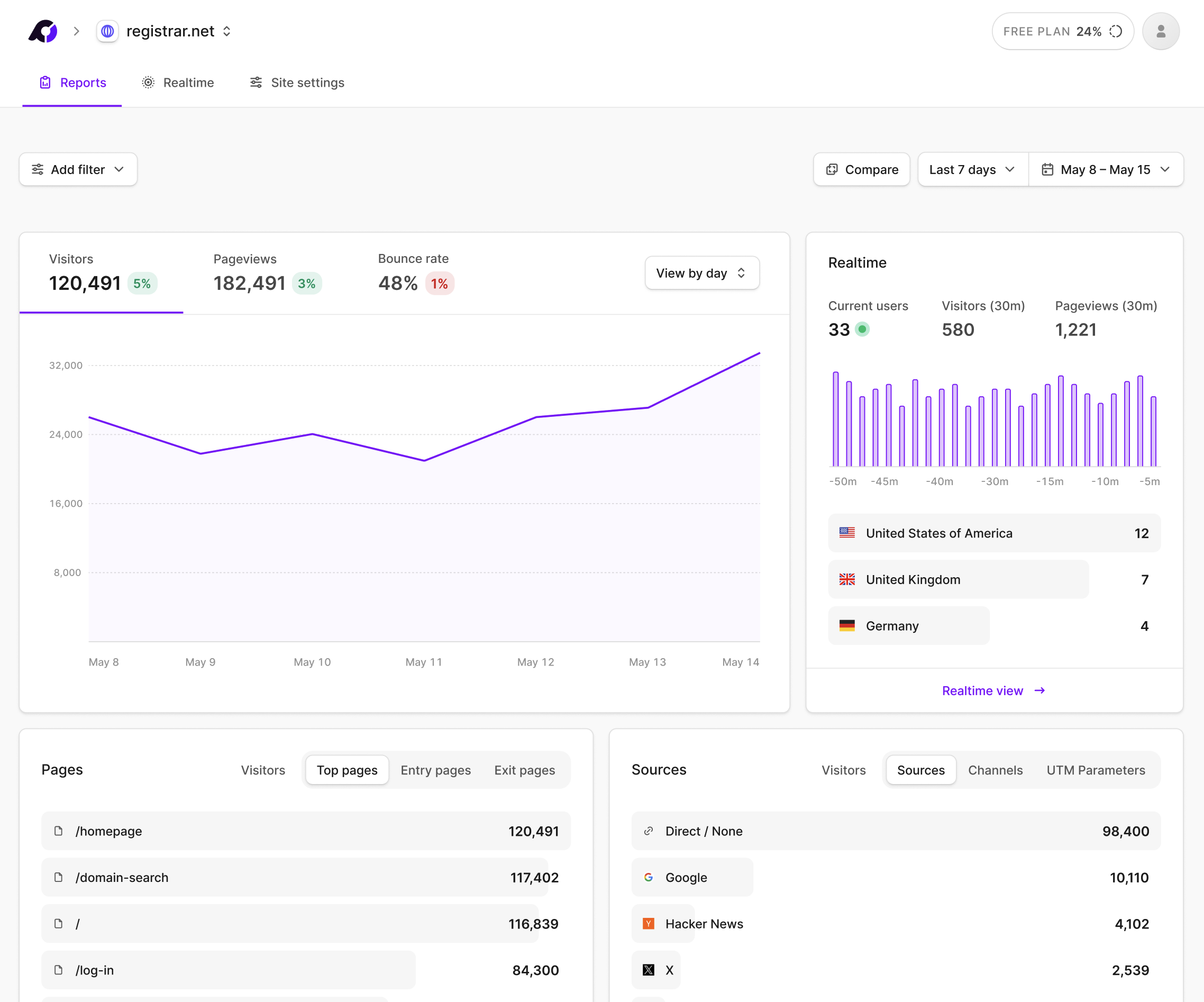
The Pageviews.ai interface focuses on the metrics most people actually use: total visitors, pageviews, bounce rate, session duration, top pages, traffic sources, referrers, geographic breakdown, and device types. Everything is on a single screen, filterable by date range, and updates in real time.
GDPR compliance in practice
Pageviews.ai is operated by a European company, hosted on EU servers, and processes no personal data. IP addresses are not stored. The anonymisation happens server-side before any data is written to disk. This means no cookie consent banner is needed — a significant operational simplification for EU-based websites.
No credit card required · Free plan available
What Users Say After Switching
Collected from independent review platforms, community forums, and direct submissions. Unedited except for brevity.
"We migrated 18 client sites from GA4 over two weeks. The process was straightforward — one script tag per site, done. What surprised us was how much cleaner the data looked. No consent-related gaps, no sampled reports. Clients actually look at their dashboards now."
"Our legal team flagged GA4 as a GDPR liability after the French CNIL ruling. We had three weeks to find a replacement. Pageviews.ai was the only tool that fully addressed the compliance requirement and didn't require weeks of reconfiguration. We also dropped our consent management platform — saving around €180/month."
"I tested Pageviews.ai alongside GA4 for 6 weeks on the same site. Pageviews.ai consistently reported 18–25% more sessions. The discrepancy comes from adblocker users — GA4 simply doesn't count them. The Pageviews.ai data is closer to what my server logs show."
"I'm not a technical person. GA4 lost me completely — I couldn't find basic stats without building custom reports. Pageviews.ai has everything on one screen. I know which posts are performing, where my readers come from, and how long they stay. Missing one star only because I'd like more data export options."
"The WordPress plugin made this trivially easy. I migrated 12 client sites in an afternoon, running Pageviews.ai in parallel with GA4 for 30 days to validate the data. The numbers are consistent and the clients are much happier with the reports I can share. Support answered my one question in about two hours."
"As a non-profit receiving public funding, our data handling is scrutinised. We had to document our compliance with Danish DPA guidance on GA4. The simplest solution was switching to an EU-hosted, cookieless alternative. Pageviews.ai resolved the compliance issue entirely — and our data quality actually improved."
How to Switch From GA4 to Pageviews.ai
Most sites complete the migration in under 10 minutes. We recommend running both tools in parallel for 2–4 weeks before removing GA4, so you can validate the data and build confidence.
Note on historical data: Pageviews.ai will not import your historical GA4 data. Your GA4 data remains accessible in Google's platform; Pageviews.ai begins fresh from the day you install it.
Sign up at pageviews.ai. The free plan supports one website. No payment information required to start.
Enter your domain name. Pageviews.ai generates a unique tracking script — a single line of HTML you'll place in your site's <head> tag.
Paste the snippet directly into your theme, or use the official plugins for WordPress, Webflow, Ghost, and other platforms.
Keep GA4 alongside Pageviews.ai for 2–4 weeks. Compare the data and understand any discrepancies (usually adblockers and consent dropoff).
Once satisfied, remove gtag.js. If Pageviews.ai is your only tracking tool, you may be able to remove your cookie consent platform — consult your legal team first.
Frequently Asked Questions
Is Google Analytics 4 actually illegal in Europe?
"Illegal" is a strong word, but the regulatory picture is serious. Data protection authorities in Austria (Jan 2022), France (Feb 2022), Italy (Jun 2022), Denmark (Sep 2022), and the Netherlands (Mar 2023) have each issued formal findings that using Google Analytics on sites serving EU residents violates GDPR, specifically because of data transfers to US servers under FISA Section 702. Companies have received enforcement notices. The risk is real and enforcement is increasing — but the degree of risk varies by country, sector, and the sensitivity of your users' data. Consult a data protection professional for your specific situation.
Do I still need a cookie consent banner with Pageviews.ai?
In most cases, no — if Pageviews.ai is your only tracking mechanism. Consent banners are legally required when you set non-essential cookies or process personal data for analytics purposes. Pageviews.ai sets no cookies and stores no personal data, so the legal trigger for a consent requirement typically doesn't apply. However, if you have other tracking tools, advertising pixels, or embedded third-party scripts, those may independently require consent. Always review your full tracking setup with legal counsel before removing your consent banner.
Will switching mean I lose important analytics data?
You'll lose access to GA4-specific features: detailed funnel analysis, audience segmentation, the GA4/Google Ads integration, and BigQuery export. Your historical GA4 data stays in Google's platform and remains accessible. What you'll gain is a cleaner, more accurate view of traffic — without the consent-gap blind spot that affects most EU-facing GA4 implementations.
How does Pageviews.ai track visitors without cookies?
Pageviews.ai uses a privacy-preserving approach that derives a daily, anonymised session identifier from non-personal signals at the server level. The raw IP address is never written to disk. The identifier is recalculated fresh each day, meaning it cannot be used to track individuals across sessions or build behavioural profiles. This architecture is distinct from browser fingerprinting.
Why does Pageviews.ai show more visitors than Google Analytics?
The main reason is ad blockers and privacy browsers. GA4's gtag.js script is on the blocklists of uBlock Origin, Privacy Badger, Brave Browser, and Safari's Intelligent Tracking Prevention. GA4 also doesn't count visitors who decline your cookie consent banner. Pageviews.ai's lightweight, cookieless script is generally not targeted by these blockers, so it sees a larger portion of your actual audience. The difference is typically 15–30% more sessions on European sites.
Can I use Pageviews.ai alongside Google Analytics temporarily?
Yes. The two scripts coexist without any conflicts. Running both in parallel for 2–4 weeks is a sensible approach — it lets you validate Pageviews.ai's data against your existing GA4 baseline before fully committing.
Is Pageviews.ai suitable for high-traffic or enterprise websites?
Yes. Pageviews.ai's infrastructure handles millions of pageviews per month. Enterprise pricing tiers offer higher data retention, team access controls, custom domains, and API access. That said, if your organisation relies heavily on GA4's advanced features — cross-device attribution, deep funnel analysis, Google Ads integration — those will need to be replaced with dedicated tools.
What does Pageviews.ai cost?
Pageviews.ai offers a free plan that includes one website with a meaningful monthly pageview allowance — sufficient for personal sites, blogs, and small businesses. Paid plans scale with pageview volume and the number of sites you manage. Visit pageviews.ai for current pricing.
This article was last updated in March 2025. We test tools independently and update our rankings when products change significantly. Our primary recommendation reflects genuine testing results. Some links on this page are affiliate links. Affiliate relationships do not influence our editorial rankings.